
Smart Home Automation Ideas for Daily Comfort
A comfortable home does not need to feel like a showroom or behave like a science project. For many American households, smart home automation works best when it removes tiny daily annoyances: the dark hallway at 6 a.m., the thermostat nobody wants to adjust, the porch light left on all night, or the garage door someone forgot to close. The point is not to make your home flashy. The point is to make ordinary routines feel calmer, safer, and easier to repeat.
That matters because comfort is built from small moments. A warm kitchen before breakfast. A bedroom that cools down before sleep. A front door camera that lets you check a package without leaving a work call. Good automation does not replace how you live; it supports it quietly. For homeowners comparing tech upgrades, trusted home improvement resources like modern living ideas can help turn scattered product choices into smarter planning. The best setup starts with your habits, not with the newest device on the shelf.
Smart Home Automation That Fits Real American Routines
Comfort starts when your home reacts to the way your day actually moves. A family in Ohio, a renter in Dallas, and a retired couple in Arizona do not need the same setup. The mistake many people make is buying gadgets first, then forcing their life around them. A better plan begins with repeat patterns: when you wake up, when you leave, when the house gets hot, when lights get missed, and when security feels thin.
Morning Scenes That Reduce Friction
A strong morning routine does not need ten devices talking at once. It needs a few helpful actions to happen without effort. Your bedroom lights can brighten slowly, the thermostat can warm the hallway, and a smart speaker can read the weather before you reach for your phone.
That kind of setup helps most in busy homes where mornings already feel tight. Parents getting kids ready for school do not need another app to open. They need the kitchen lights on, the coffee maker ready, and the entryway bright enough to find backpacks without turning the house upside down.
The counterintuitive part is that fewer automations often feel better. One clean morning scene beats a dozen tiny commands that misfire or annoy everyone. Comfort comes from trust, and trust comes from routines that work the same way every weekday.
Evening Settings That Help the House Wind Down
Evenings carry a different kind of pressure. The house shifts from work mode to rest mode, and the right connected home setup can make that shift feel natural. Living room lamps can dim after dinner, outdoor lights can turn on at sunset, and bedroom temperatures can drop before sleep.
A homeowner in a Boston suburb might set porch lights to follow sunset during winter, when darkness arrives before dinner. Someone in Phoenix might focus more on cooling schedules because late-day heat lingers in walls and windows. Same concept, different comfort problem.
Good evening automation also avoids bossing people around. Nobody wants a house that turns off lights while they are still reading. Use motion sensors where they help, but give family members easy wall controls too. A smart home should feel polite.
Comfort Through Lighting, Climate, and Small Daily Details
Once the main rhythm feels right, comfort becomes more personal. Lighting, temperature, and small reminders shape how a home feels hour by hour. This is where smart devices earn their place, not because they are impressive, but because they solve tiny irritations before they grow into daily complaints.
Lighting That Matches the Room’s Real Job
Lighting should follow the purpose of each room. A kitchen needs bright task lighting in the morning, softer under-cabinet light at night, and simple controls when hands are full. A bedroom needs calmer light because harsh ceiling glare at 10 p.m. makes rest feel farther away.
Smart bulbs, dimmer switches, and motion sensors can all work, but switches often make more sense for shared spaces. Guests understand switches. Kids understand switches. Apps should be the backup, not the only way to control the room.
A useful trick is to automate transitions, not every single action. Set hallway lights to low brightness after 11 p.m. Set bathroom lights to avoid full glare during late-night trips. Small changes like that feel more human than a house trying to perform.
Climate Control Without Family Thermostat Battles
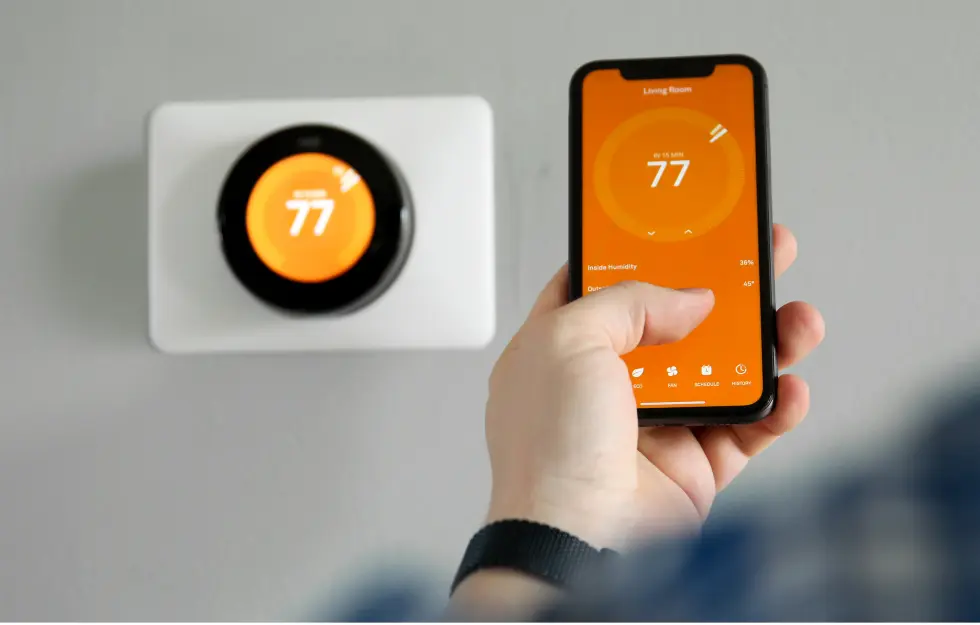
Temperature is where automation can save both comfort and money. A smart thermostat can learn when people are home, lower heating or cooling during empty hours, and prepare the house before everyone returns. ENERGY STAR notes that smart thermostats can help reduce energy use when programmed and managed well through better heating and cooling control.
The real benefit, though, is peace. In many U.S. homes, the thermostat becomes a quiet argument. One person is cold, another is hot, and someone keeps changing settings without telling anyone. Scheduling reduces that tug-of-war because the home follows agreed patterns.
Energy saving automation works best when it respects comfort first. A Florida family may set cooling to ease back during school hours, then recover before the late afternoon heat peaks indoors. A Minnesota household may care more about steady winter warmth. Automation should lower waste without making the house feel punishing.
Safety, Security, and Peace of Mind Without Paranoia
Security automation works best when it lowers anxiety instead of feeding it. Cameras, locks, sensors, and alerts can help you feel aware, but too many notifications can make a normal day feel suspicious. The goal is a calmer home, not a nervous one.
Entryway Automation That Makes Daily Life Easier
The front door is the best place to start because it handles packages, guests, kids, contractors, and late arrivals. A video doorbell can show who is there, while a smart lock can give temporary access to a dog walker or visiting relative. That solves real problems without turning the whole house into a control center.
Picture a homeowner in Atlanta who receives deliveries during work hours. A doorbell camera confirms the package arrived, a porch light turns on after sunset, and a lock code lets a trusted neighbor place the box inside during bad weather. That is practical comfort.
Still, entryway automation needs restraint. Do not hand out permanent codes when temporary ones will do. Remove access after a guest leaves. Review settings every few months. A secure system depends less on expensive gear and more on habits that do not get sloppy.
Alerts That Matter Instead of Constant Noise
Alerts should be rare enough that you respect them. A water leak sensor under the washing machine deserves attention. A smoke alarm alert matters. A garage door left open after 10 p.m. matters. A motion ping every time a tree shadow moves does not.
This is where many homeowners ruin their own connected home. They turn on every alert, get annoyed within a week, then ignore the system that was meant to protect them. Smart security should act like a good neighbor: present, useful, and quiet until something needs attention.
Privacy also belongs in the comfort conversation. The Federal Trade Commission advises consumers to protect connected devices with strong passwords, updates, and privacy settings. That advice sounds plain, but plain habits protect households better than flashy promises.
Building a System That Stays Useful for Years
A smart home should age well. The worst setup is the one that feels exciting for a month, then turns into a pile of forgotten apps, dead batteries, and devices nobody else in the house understands. Long-term comfort depends on simple choices made early.
Choose Devices Around One Control Habit
Every home needs a main control habit. That might be voice control, wall switches, an app, or scheduled scenes. Mixing all of them without a plan creates confusion. People should know how to turn things on and off without asking the most tech-savvy person in the house.
Voice control works well for kitchens, bedrooms, and accessibility needs. It helps when your hands are full or when walking to a switch is inconvenient. Still, voice should not be the only option because guests, kids, and sleepy adults often need something simpler.
A practical setup gives each room a default. Living rooms may rely on switches and scenes. Bedrooms may use schedules. Kitchens may use voice control for timers, lights, and music. The system feels smoother when each space has a clear way to behave.
Start Small, Then Expand With Purpose
The smartest upgrade path is boring in the best way. Start with one comfort problem, solve it, then move to the next. Try lighting first, then climate, then entryway security. That order helps you learn what your household enjoys before spending more money.
Many Americans start with a smart speaker and a few bulbs, then jump too quickly into cameras, locks, plugs, sensors, hubs, and subscriptions. The pile grows faster than the value. A better approach is to ask one question before every purchase: will this remove a daily annoyance or create another thing to manage?
Smart home automation should feel like a home getting better at caring for the people inside it. The strongest systems are not the loudest or the most expensive. They are the ones your family uses without thinking, trusts without arguing, and keeps because life feels easier with them.
Conclusion
The best comfort upgrades do not ask your home to become something else. They help it respond with better timing, better memory, and fewer small failures during the day. That is why the smartest plan begins with routines, not devices. Watch where your household repeats effort, forgets tasks, wastes energy, or feels less secure than it should.
Start with one room this week. Choose the moment that bothers you most, whether it is a dark hallway, a hot bedroom, a missed porch light, or a thermostat battle that never ends. Build around that one friction point before adding more.
Smart home automation is not about showing off technology. It is about giving your home a better sense of timing. Choose simple tools, keep manual controls, protect privacy, and expand only when the next upgrade has a clear job. Your next step is simple: pick one daily annoyance and automate it so well that nobody in the house misses the old way.
Frequently Asked Questions
What are the best smart home ideas for daily comfort?
Start with lights, thermostat schedules, doorbell cameras, and smart plugs. These upgrades solve common daily problems without making the home hard to manage. Focus on one routine first, such as mornings, bedtime, or leaving for work, before adding more devices.
How can smart devices make a home more comfortable?
Smart devices improve comfort by handling repeated tasks at the right time. Lights can adjust by schedule, thermostats can prepare rooms before you arrive, and sensors can catch issues early. The best devices reduce effort without making people depend on apps for every action.
Is voice control useful for everyday home routines?
Voice control works well in kitchens, bedrooms, and shared rooms where hands-free commands help. It is useful for lights, timers, music, reminders, and simple scenes. Keep switches or app controls available too, because every household needs a backup when voice commands feel inconvenient.
What smart home upgrades help lower energy bills?
Smart thermostats, lighting schedules, occupancy sensors, and smart plugs can reduce waste. They work best when matched to real routines, such as work hours, sleep times, and peak heating or cooling periods. Energy savings improve when comfort settings stay realistic.
How do I start a connected home without spending too much?
Begin with one problem and one room. A smart plug, dimmer switch, or thermostat can teach you what works before you buy more. Avoid buying large bundles at the start. A small setup that solves a daily issue beats a big system nobody uses.
Are smart locks safe for American homes?
Smart locks can be safe when you use strong passwords, temporary guest codes, updates, and two-factor authentication where available. They are most helpful for families, cleaners, pet sitters, and deliveries. Review access codes often and remove old ones after they are no longer needed.
What is the easiest room to automate first?
The living room or entryway is often easiest because the benefits show up fast. Smart lamps, porch lights, doorbell cameras, and simple scenes are easy to understand. Bedrooms also work well when the main goal is better sleep and calmer nighttime lighting.
How can I keep smart home privacy protected?
Use strong unique passwords, update device software, limit camera placement, and review app permissions. Buy from brands with clear privacy settings and support policies. Keep sensitive devices off when they are not needed, and avoid placing cameras in private indoor spaces.